STATE-HOUSE GOTV · DISTRICT 14 · 12,847 DOORS

Canvassing software for political campaigns, the field side of a precinct walk.

Beacon manages canvassing, the door-to-door side of a campaign. You import the voter file (the official list of registered voters), divide precincts, and send walk lists (the addresses each canvasser will visit) to canvasser phones. A live dashboard shows your GOTV (getting out the vote) coverage. It is built for how state-house and federal field programs are organized.

For
Campaigns & PACs
Canvassers
Unlimited
Free trial
14 days
MADISON CHEN · 58% TO GOAL
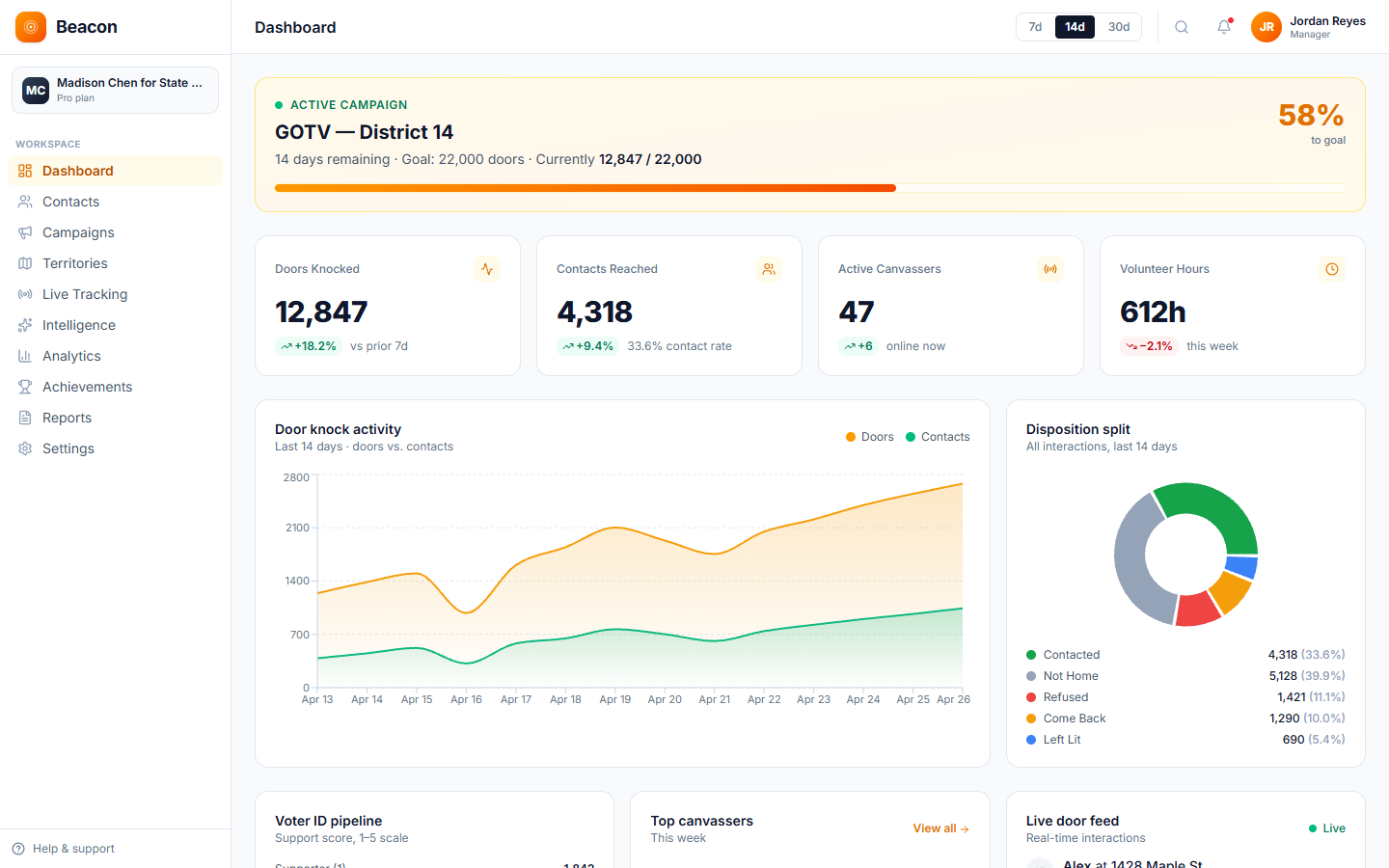
Beacon GOTV dashboard for the Madison Chen for State Senate campaign: 12,847 of 22,000 doors knocked, 47 active canvassers, live split of door results
Built for  state-house GOTV · federal field · ballot measure · voter ID · field fundraising part of the CNX Suite · with CampaignCNX+ & Alma

Territories

Plan precinct canvassing on a map instead of a spreadsheet.

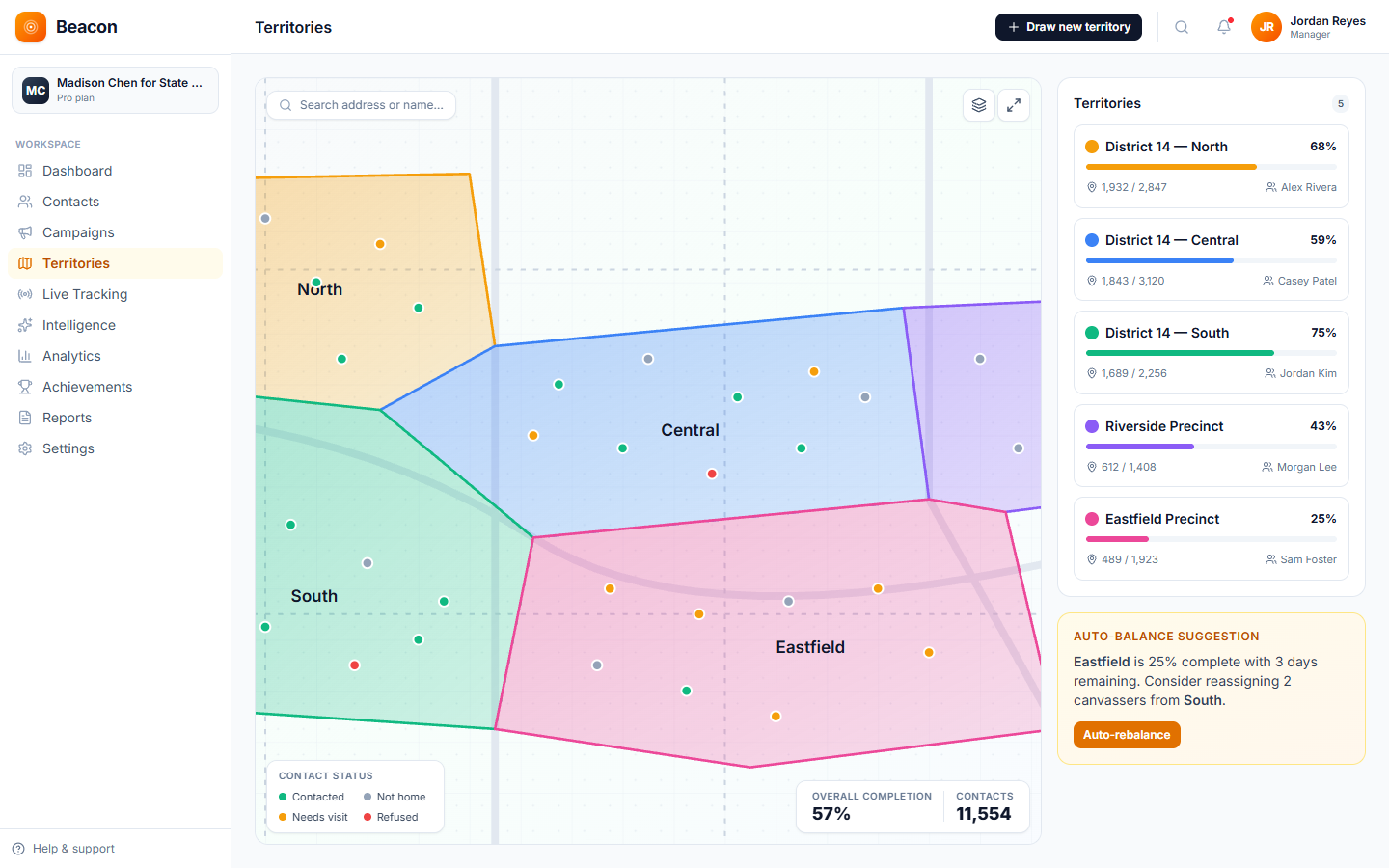
Draw a shape around a precinct on the map, name it, and assign canvassers. The voters inside the boundary become a walk list, ordered by street so canvassers do not walk the same blocks twice. If your target voters change during the campaign, redraw the territory and the walk lists update to match.

  • District 14, North 4,287 voters · 49% covered
  • District 14, Central 3,895 voters · 71% covered
  • District 14, South 2,148 voters · 38% covered
  • Eastfield Precinct 1,532 voters · 81% covered
  • Riverside Precinct 985 voters · 62% covered
Beacon territories page showing five color-coded precinct polygons across District 14 with live coverage percentages

The platform

Canvassing software for political campaigns that keeps the field director and canvassers on the same record.

Every door visit is saved to the same record the field director sees on the GOTV map, so there are no paper walk sheets to collect and no end-of-night spreadsheets for the data director.

/01, DESK

Field director console

The office screen where you divide precincts, write scripts, and assign canvassers. Its live GOTV map fills in as the team works through its turfs (the areas assigned to each canvasser). The campaign manager and consultants see the same view.

  • Voter file import + VoterID matching
  • Walk-list builder (target voters → list)
  • Persuasion + ID door-result templates
  • Live GOTV map & activity feed

/02, DOOR

Voter file walk app

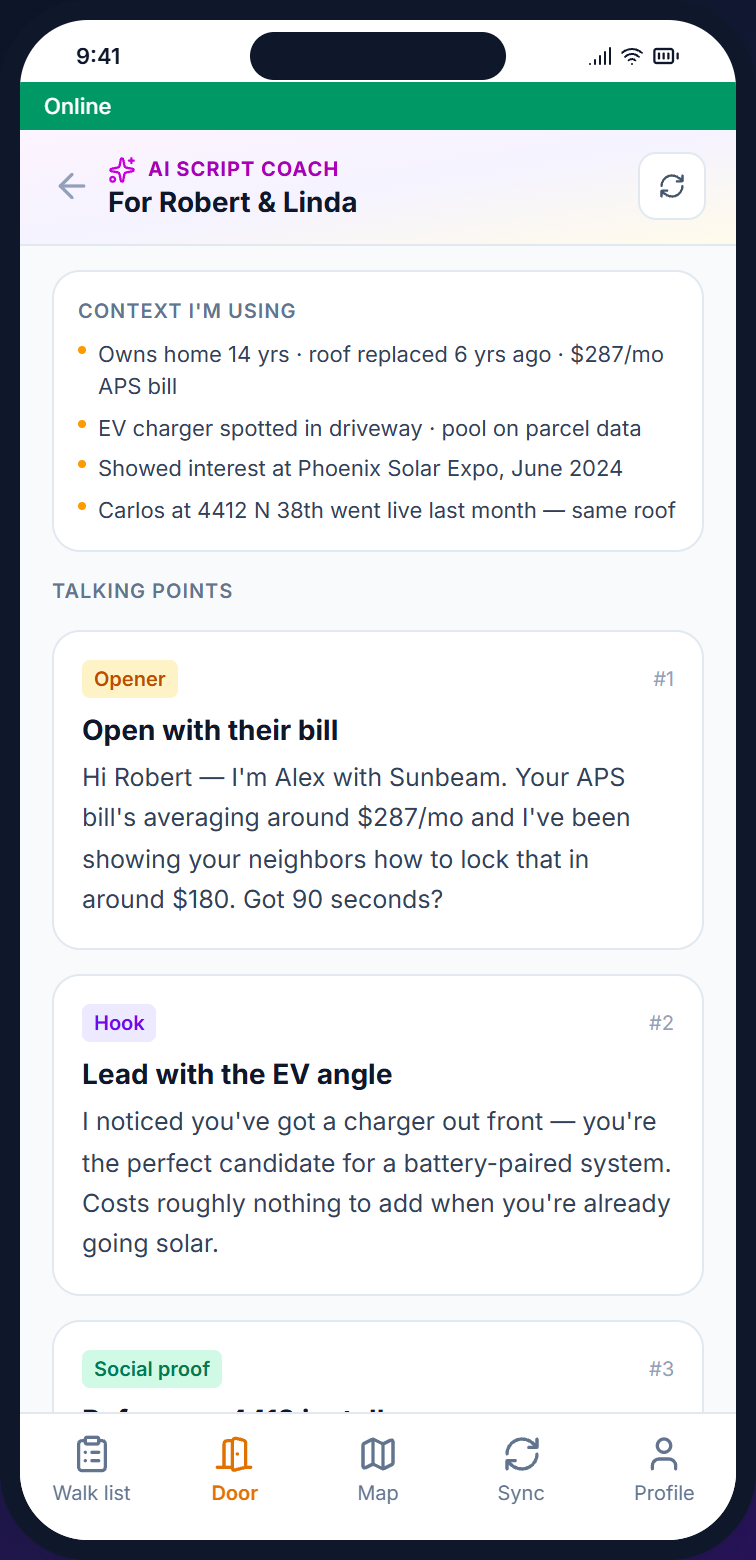
The phone app for canvassers. It holds the walk list, the voter screen, the AI Script Coach (a paid add-on), and an upload queue. Anything recorded without cell signal is saved on the phone and uploaded when the connection returns.

  • Route-ordered walk list (auto-ordered by street)
  • Voter screen with party, history, issues
  • AI Script Coach add-on, talking points per door
  • Works offline · basements & rural areas

/03, MAP

Live GOTV canvassing app dashboard

Each door visit updates the map as it happens. The dashboard shows coverage by precinct, door results by canvasser, and the share of voters identified by neighborhood, so no one needs to run a report.

  • Real-time canvasser location (opt-in, Growth plan and up)
  • Precinct coverage % live-updating
  • Persuasion vs. ID split per turf
  • CSV export for upload to your voter database

Campaign types

Political campaign canvassing for every program, with door results that fit each one.

A state representative's persuasion canvass and a 72-hour GOTV effort record different information. Beacon is set up around what each program records, so the same account handles both without being rebuilt between elections.

GOTV

GOTV canvassing app for the final 72 hours.

Work from a targeted list of supporters, with a shorter set of door results and a drop-off mode for early-vote runs. The GOTV dashboard shows coverage and turnout as they happen, so the field director can move people where needed.

Captures: Voted · Not Yet · Wrong Address · DNC

  • UNIVERSELikely-supporter file, geocoded and ordered
  • WAVESSat / Sun / Mon / Tues morning re-walks
  • FLAGSNeeds ride, early vote returned, language preference
  • EXPORTEnd-of-shift CSV for the data director
Persuasion / ID

Voter ID and persuasion canvassing.

Earlier in the campaign, canvassers rate each voter's support from 1 to 5 (often called voter ID), ask issue survey questions, and flag people for fundraising or volunteer follow-up. Each conversation adds new information to the voter file.

Captures: Support 1-5 · Issue Priority · Follow-Up · Volunteer

  • SCRIPTAI Coach add-on pulls voter history + issues
  • SURVEYIssue-priority capture per door
  • CONSENTPermission to text or email (opt-in) recorded at the door
Field fundraising

In-person donation requests for finance teams.

It is for finance teams that visit a donor list rather than a voter list. Suggested amounts appear at the door, follow-up flags go to the call dialer, and door results copy to the campaign record, so no one has to match records after the shift.

Captures: Pledge · Follow-Up · Hard No · Already Maxed

  • FILEDonor list with giving from past elections
  • ASKSuggested amounts for each donor level
  • FLAGUnpaid pledges move to the call list automatically
  • COMPLYFields for FEC (Federal Election Commission) reporting built into the form

How a precinct gets walked

Precinct canvassing from file upload to GOTV debrief in four steps.

The steps are the same for a 220-door city council race and a 12,000-door state-house campaign. Most teams can finish the setup in an afternoon.

/01

Import the voter file

Bring a CSV export from your voter database or vendor, or your state voter file. During import, Beacon matches each VoterID, reads party affiliation, and places every voter on the map.

/02

Divide the precincts

Draw territories on the map, and the target voters inside each one become a walk list. Each turf shows how many doors it holds, so you can see when one has too many or too few.

/03

Visit doors and identify support

At each door, canvassers use the door screen to record the result, support from 1 to 5, issue priority, and follow-up flags. This works offline, and the records upload as soon as signal returns.

/04

GOTV-ready debrief

Live coverage, the split between persuasion and ID contacts, and top performers are totaled automatically. At the end of the campaign, you export a file the data director uploads to your voter database.

On the doorstep

The voter file walk app that shows who lives at each door before it opens.

The voter screen shows the voter's party, lead score, and earlier contacts. With the paid add-on, the AI Script Coach uses that to suggest a one-line opening for the household. The app keeps working offline and uploads records when cell signal returns.

See how canvassers use it →
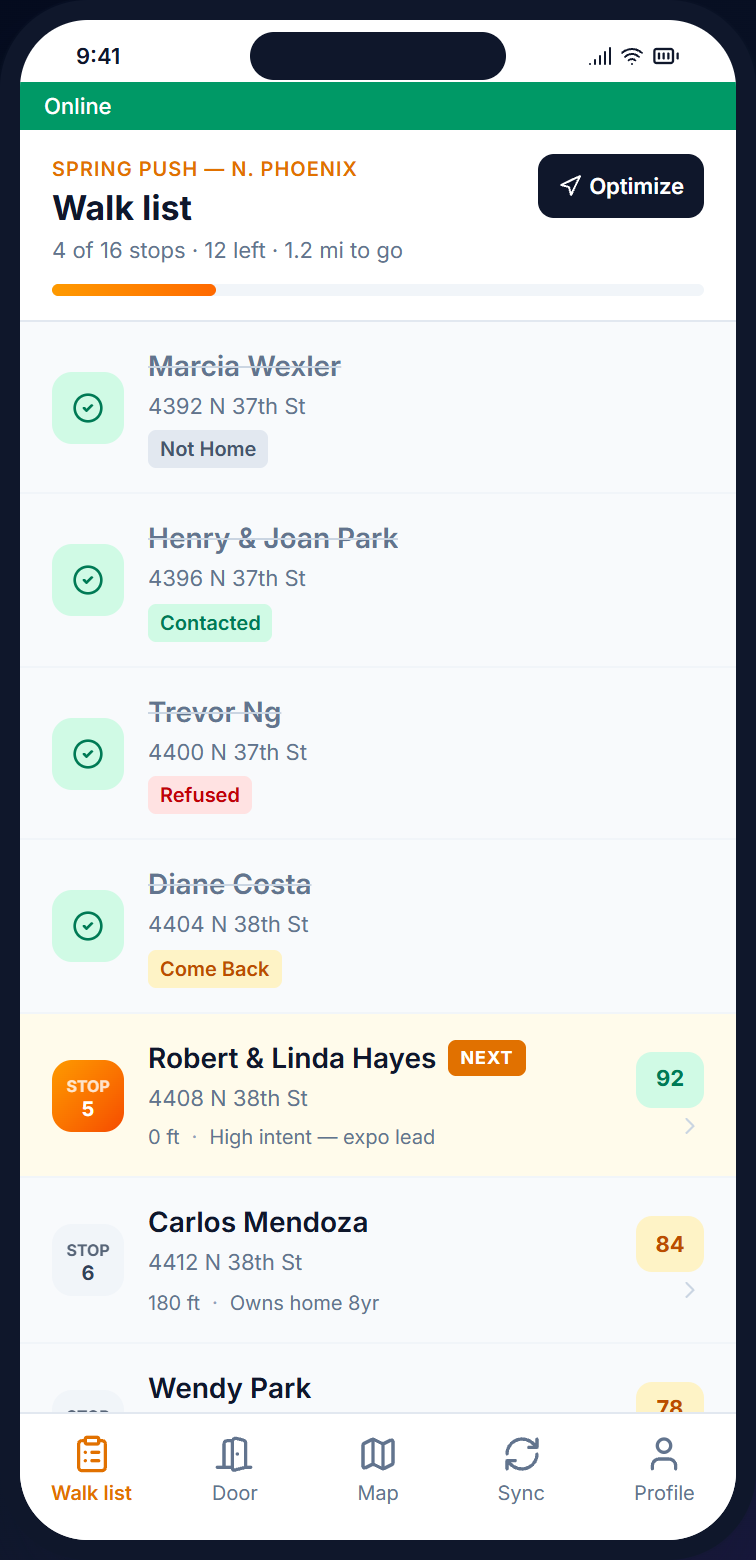
Beacon mobile walk list, route-ordered voter list with disposition status and party tag per stop
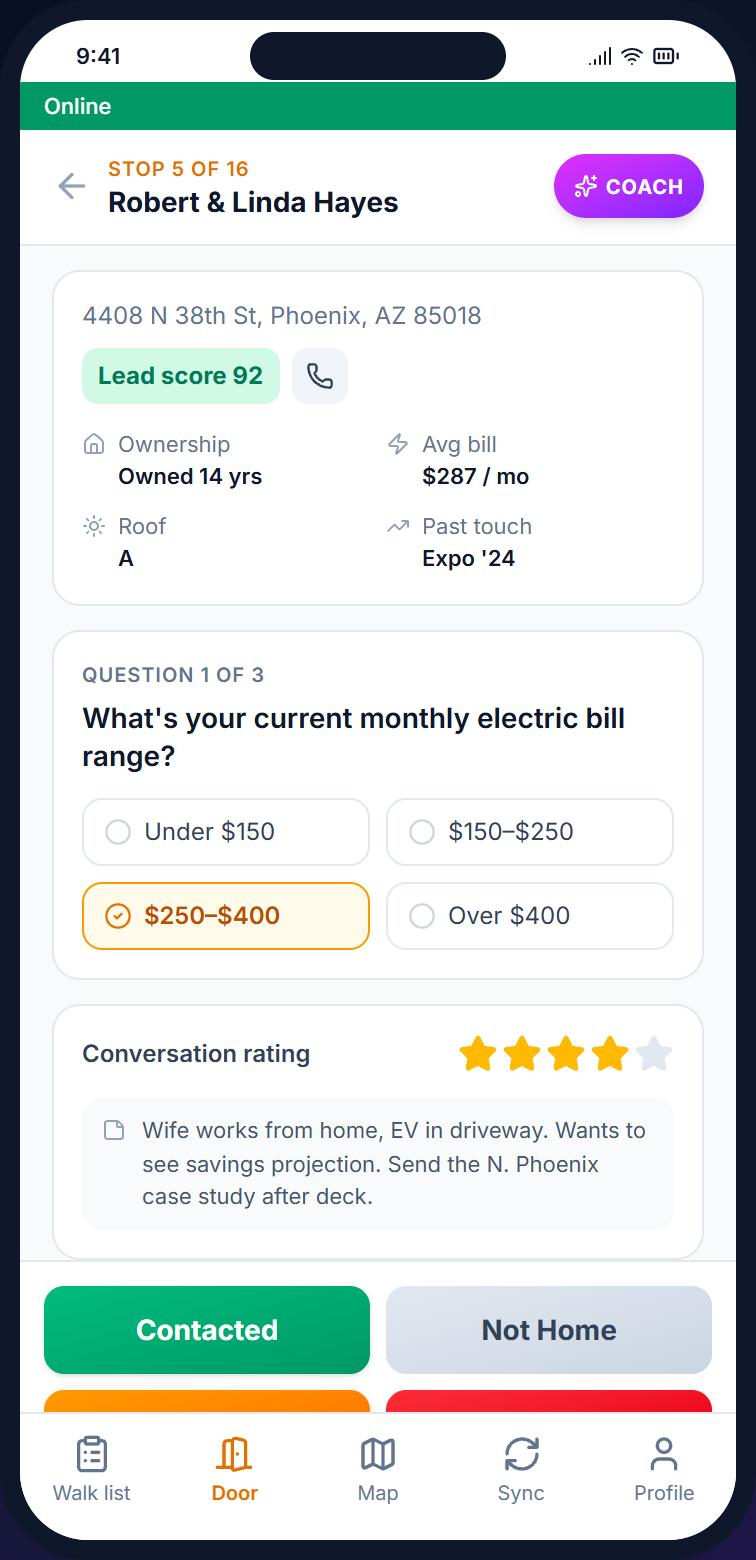
Beacon mobile voter screen with disposition buttons and survey question for issue priority
AI Script Coach overlay generating context-aware talking points based on the voter's issue history and household specifics

Campaign FAQ

Political campaign canvassing software FAQ: the questions field directors ask first.

/Q, VOTER FILES

Can Beacon import my voter file export?

Yes. The CSV import matches VoterIDs and brings in party affiliation, vote history, and district codes. Standard CSV exports from common voter data vendors and most state voter files also import without problems.

/Q, PRICING

Is pricing per canvasser?

No. Pricing is based on the number of voters on your list (contacts), not the number of volunteers, so 5 canvassers or 500 cost the same. There are six tiers, from Starter at $59 (2,500 contacts) up to Enterprise at $599 (250K+).

/Q, OFFLINE

Does it work in rural districts and apartment basements?

Yes. The mobile app keeps working without cell signal. Door results are saved to the phone and uploaded to the server when the connection returns, so results from basements, rural routes, or parking garages are not lost.

/Q, COMPLIANCE

Does it support FEC fields and TCPA rules on texting?

Donor occupation and employer fields are built in for finance teams. Permission to text (SMS opt-in) is recorded at the door, the DNC (do-not-contact) list is enforced by default, and every record has an audit log.

/Q, INTEGRATION

How does Beacon work with CampaignCNX+ and Alma?

The CNX Suite has four products: Beacon, CampaignCNX+, Alma, and CoreCNX (a CRM). They can be bought together on one bill, and you sign in to each with the same email address. CampaignCNX+ is a separate texting product with its own plans and its own account, and a door result in Beacon does not start a CampaignCNX+ text. Beacon door results, appointments, and contact status are added to the voter's record in CoreCNX. Alma, the website chatbot, is also a separate product with its own account.

/Q, SETUP

How long until we can start visiting doors?

Most campaigns are visiting doors within three days of signing up. The account is live the same day. The voter file imports while you draw your first territory, and walk lists are on canvasser phones by the next morning. A real person, not a chatbot, handles onboarding.

Get started

Start your first GOTV canvassing walk this week.

Open an account, import your voter file, and draw your first territory. Within a few days, your canvassers will be visiting doors with walk lists in street order on their phones, plus the AI Script Coach if you add it.

Setup
Same day
Onboarding
Real person, not a chatbot
Free trial
14 days, no card