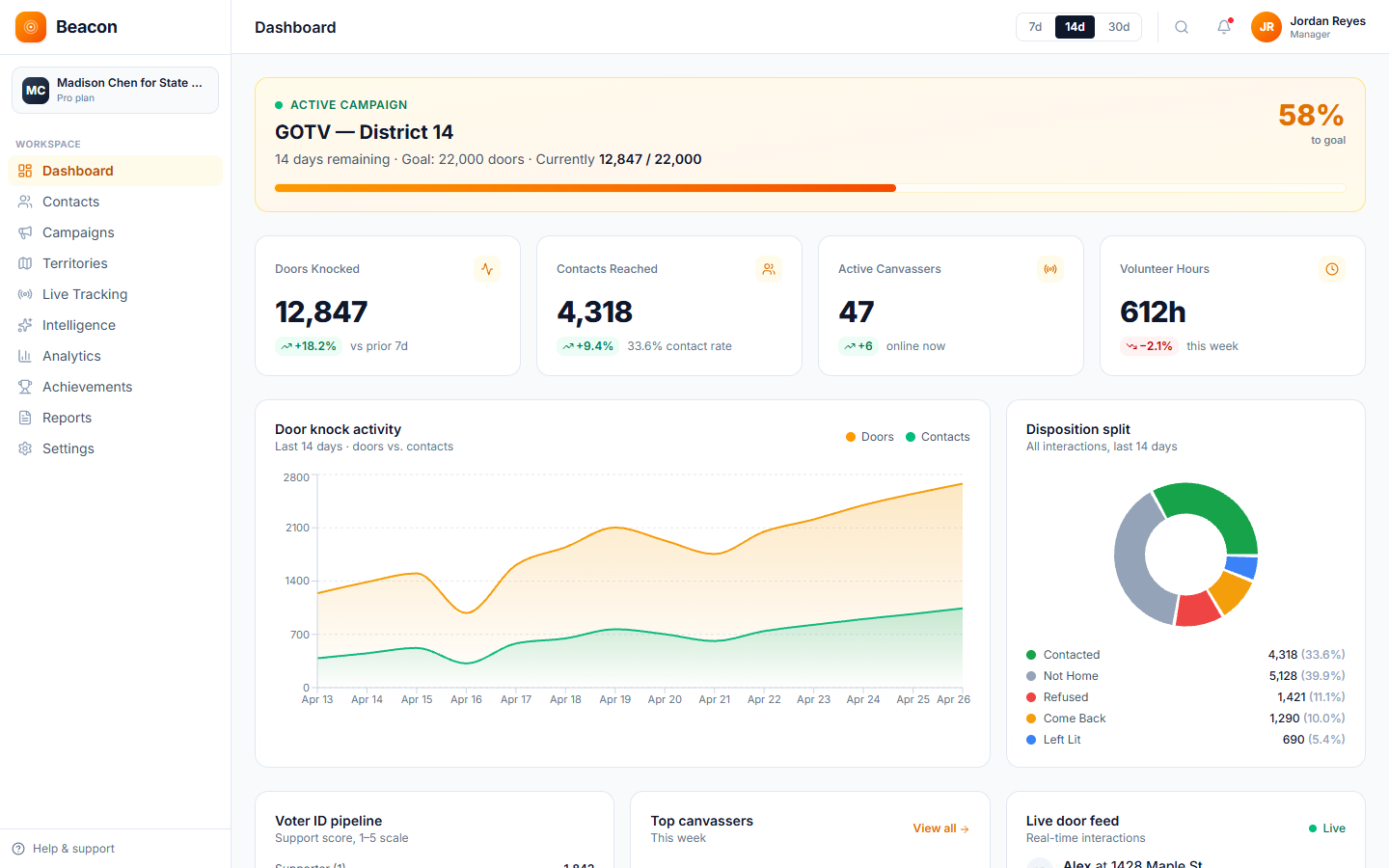
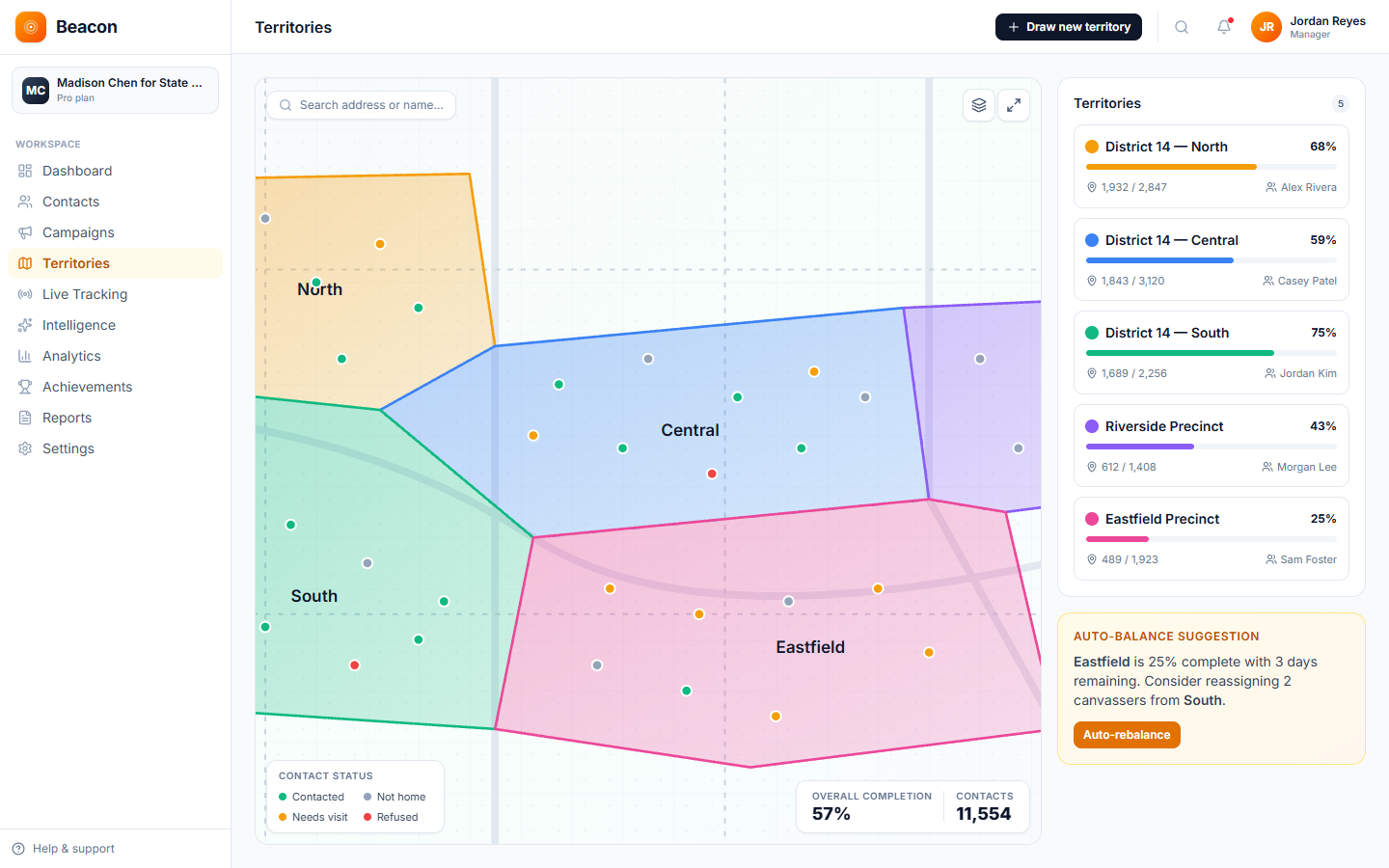
For a church, canvassing means volunteers visiting neighborhood homes to talk with families in person. With Beacon, the volunteer at the door can see the family's name and the notes from earlier visits, such as the children's names or that the family came to Easter service. The visit record helps outreach teams avoid visiting the same homes by mistake, and visit notes are kept on each household's record instead of on clipboards.
Parish areas
Draw a shape around a parish boundary or neighborhood and assign a volunteer team. The households inside become a visit list, and when a volunteer downloads it, Beacon puts it in walking order, one street at a time, with each street's doors in house-number order. Beacon warns when two areas overlap, and the visit record helps teams avoid knocking on the same door twice.
The platform
Every visit is saved to the same record the outreach pastor sees, so visit notes are not kept in separate notebooks, and the visit record helps teams avoid visiting the same homes twice.
DESK
This is the office screen where you divide parish areas, write conversation guides, and assign volunteer teams while seeing which homes have been visited. The outreach pastor can review this dashboard before a staff meeting.
DOOR
The phone app for volunteers. It holds the visit list, the household screen, the conversation guide, and an upload queue. Open the app with signal before the shift. After that, door results and photos keep saving on the phone if signal drops. When you have signal again, tap Sync to send everything waiting. Beacon also tries on its own while it's open.
MAP
Each visit reaches the live activity feed. Each neighborhood shows the share of its households reached, the dashboard shows visits and door results, and survey answers, such as event invitations, export to CSV.
Visit history
When a volunteer visits a home, family details such as the children's names go in the notes. When another volunteer visits the same home later, the notes from the first visit are on the screen, so the conversation continues from where it stopped.
How outreach runs
The steps are the same whether you are running a one-day Saturday food drive or a year-round neighborhood ministry program.
/01
Draw neighborhoods on the map and bring in the households inside them from your existing roster or a neighborhood list you already have, so each household has a record.
/02
Choose the team. When a volunteer downloads the visit list, Beacon puts it in walking order, one street at a time, with each street's doors in house-number order. You attach a conversation guide for the reason for the visit, such as an invitation, a follow-up, or a prayer drop-off.
/03
Volunteers use the household screen to record the result, notes and family details, and event interest as a survey answer. Once the app has been opened with signal, the records keep saving if signal drops.
/04
Export notes, door results and survey answers to CSV for the prayer team and leadership, and download a PDF report of visits and door results whenever you need one.
Outreach types
A Saturday morning food drive and a neighborhood ministry program that lasts a full quarter are different kinds of work. You set up Beacon around what each outreach effort is trying to accomplish.
Visiting every household in the parish area once each quarter builds familiarity over time. As the visit history grows, each volunteer can see what was said at earlier visits.
Captures: Family Details · Spiritual Interest · Service Need · Notes
These visits identify households that need help, deliver groceries or coats, and record any follow-up needs. The delivery stops go on the visit list, in walking order, and each stop's result shows which deliveries are done.
Captures: Need Type · Delivered · Refused · Follow-Up Required
These are invitation campaigns planned around a date. Record who received an invitation and who said they would attend. The next week, follow up personally with the people who did not attend.
Captures: Invited · Confirmed · Declined · Notes
Outreach FAQ
TONE
A visit with no background on the household can feel impersonal. With Beacon, the volunteer arrives knowing the family's name, earlier conversations, and what matters to them, so each ministry visit can build on the last.
PRIVACY
Access depends on each person's role (owner, admin, manager or canvasser). Managers and up draw the areas and run analytics and exports. Volunteers record visits in the phone app and can read each household's record and visit notes, so write notes with that in mind.
PRICING
No. Pricing is based on the number of households on your contact list, not the number of volunteers, so 5 volunteer teams or 50 cost the same. There are six tiers, from Starter at $59 (2,500 contacts) up to Enterprise at $599 (250,000).
WEAK SIGNAL
Yes, once the app has been opened with signal before the shift. After that, visit notes keep saving on the phone if signal drops, so a volunteer does not lose a note in a stairwell. When you have signal again, tap Sync to send everything waiting. Beacon also tries on its own while it's open.
INTEGRATION
Beacon exports CSV files that work with any church management system (ChMS) that accepts imports. Text message follow-ups are sent from CampaignCNX+, a separate product with its own plans and its own account. The CNX Suite has five products: CoreCNX (a CRM), CampaignCNX+, Beacon, Alma, and DeadVault. They can be bought together on one bill, and you sign in to each with the same email address.
SETUP
Outreach can start as soon as your list is in and your first parish area is drawn. New accounts are reviewed and approved by a person, and the 14-day trial starts at approval. Parish areas are drawn on the map during onboarding, and volunteer teams open the app on their phones the same week. White-glove setup is $299 flat if you want help planning the program.
Start visiting
Open an account, draw your parish area, and import your household list. Within a few days, your volunteer teams will be visiting homes with lists in walking order and a conversation guide matched to the reason for each visit.