SERVICE AREA · NORTH PHX · 3,895 LEADS · 49% COVERED

Home services door-knocking app, for crews that live in the truck.

Beacon manages the door-to-door side of a home services business (often called canvassing). You draw service areas the way your crews drive, and visit lists are ordered to reduce driving time. Every door shows the lead score and earlier visits, and homeowners sign digital estimates at the curb. It is built for HVAC, roofing, and lawn crews that have outgrown paper quotes and whiteboards.

For
Solar · roof · HVAC
Techs / reps
Unlimited
Free trial
14 days
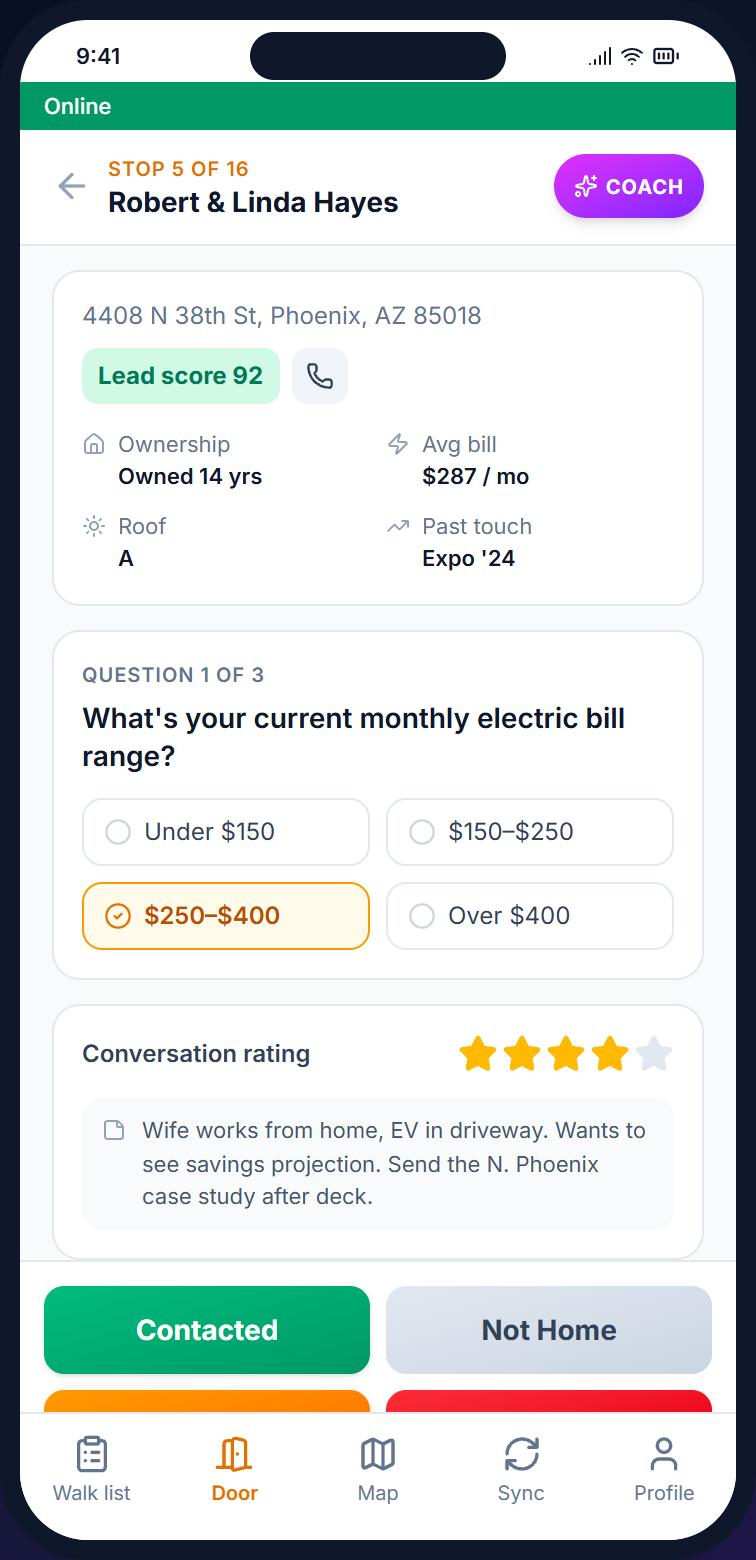
4408 N 38TH ST · LEAD SCORE 92
Beacon mobile door screen at 4408 N 38th St for Robert and Linda Hayes, with a lead score of 92
Built for  solar · roofing · HVAC · windows · siding · gutter · pest · low-voltage part of the CNX Suite · with CampaignCNX+ & Alma

Service areas

Route canvassing for home services, service areas drawn the way trucks drive.

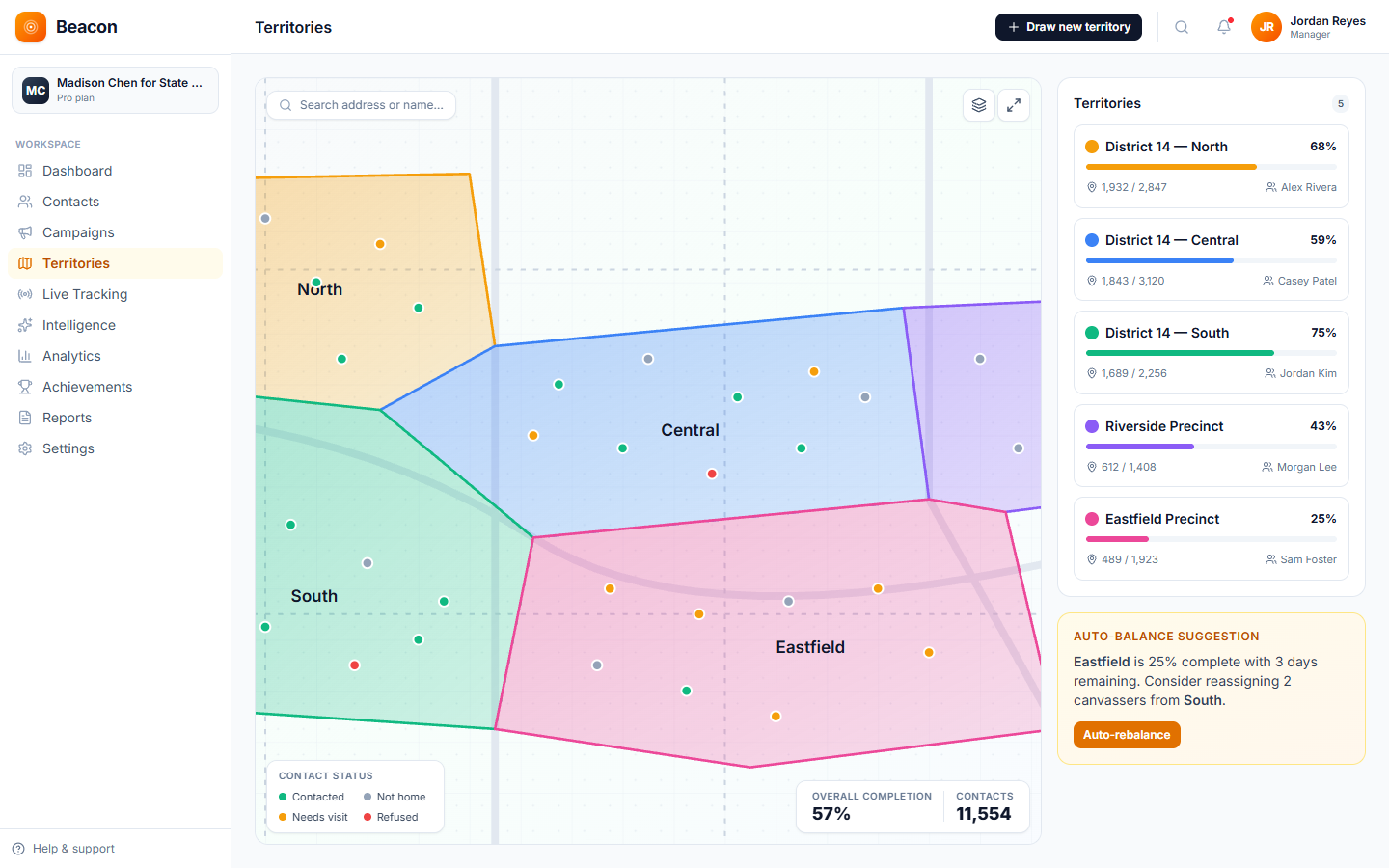
Draw a shape around a service area, name it, and assign reps and technicians. Each lead gets a rule-based lead score from its visit history and contact details. The visit list is ordered to shorten the route between stops.

  • North Phoenix, Arcadia 2,148 leads · 71% covered
  • North Phoenix, Biltmore 1,287 leads · 38% covered
  • Scottsdale, Old Town 985 leads · 62% covered
  • Tempe, South 1,532 leads · 81% covered
  • Mesa, Northwest 895 leads · 49% covered
Beacon service area map showing five color-coded territories across the Phoenix metro with live coverage percentages and lead counts

The platform

Home services door-knocking app that keeps the operations manager and reps on the same record.

Every visit, quote, and signed estimate is saved to the same record the office manager sees, and contacts and door results export to CSV, so there are no whiteboards or paper estimates left in the truck cab.

/01, DESK

Operations console

The office screen where you divide service areas, score your full lead list, assign reps and technicians, and track coverage by territory. The owner reviews the same view at the start of the week.

  • Lead list import + data enrichment
  • Visit-list builder, route-ordered
  • Estimate and proposal templates (merge fields)
  • Coverage % and door results by territory

/02, DOOR

Field marketing for HVAC, roofing, and lawn reps

The phone app for reps. It holds the visit list, the lead screen, follow-up scheduling, and an upload queue. Anything recorded without cell signal is saved on the phone and uploaded when the connection returns.

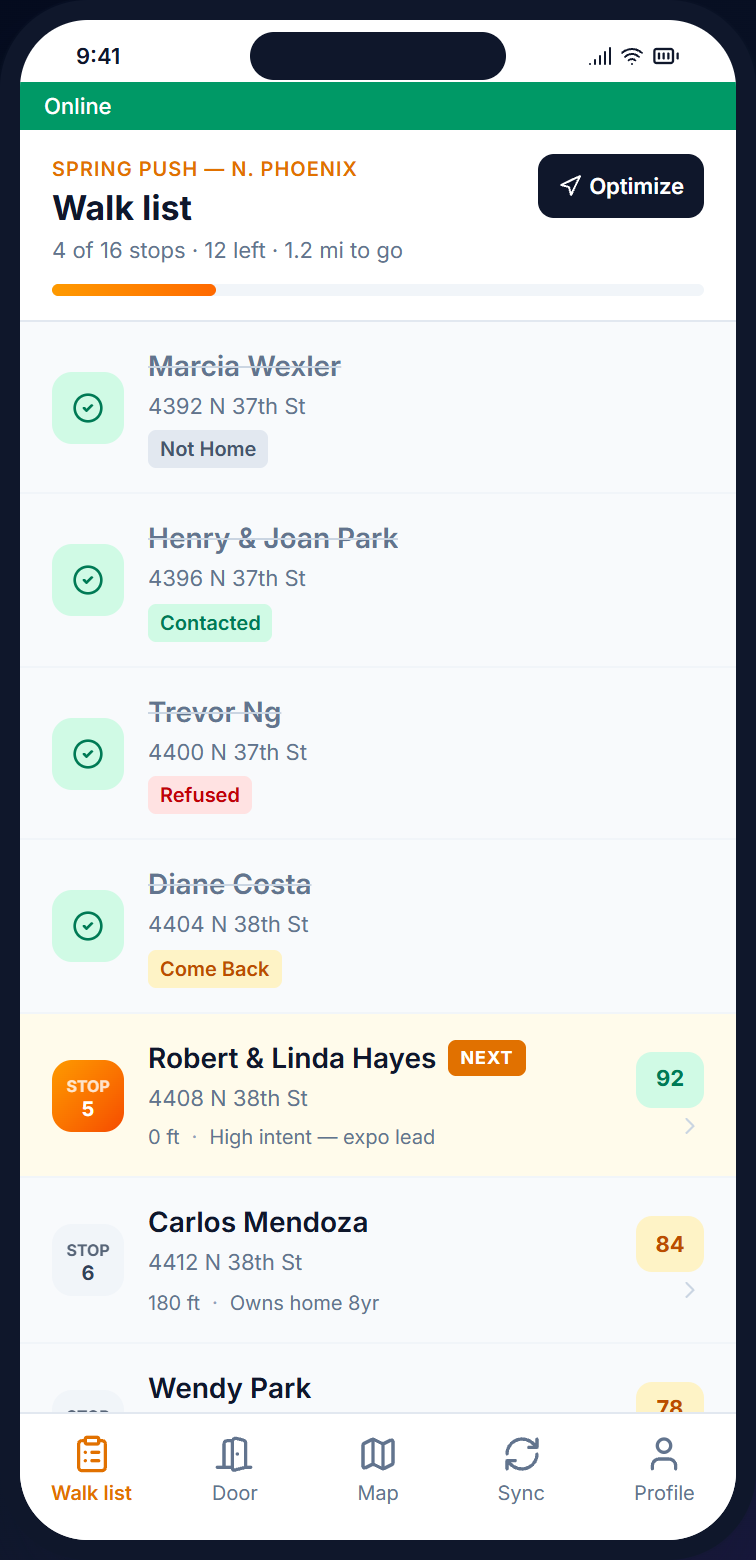
  • Visit list ordered to shorten the route
  • Lead score and visit history at each door
  • Instant estimate from template, signed at the curb
  • Works offline · suburban areas with no signal

/03, MAP

Territory coverage tracking

Each visit updates the map as it happens. Contact pins on the map are colored by each contact's status, and the dashboard shows doors knocked, the contact rate, door results, and a leaderboard, so no one needs to run a report.

  • Real-time rep / tech location (opt-in, Growth plan and up)
  • Service area coverage % live-updating
  • Doors and contacts per rep on the leaderboard
  • CSV export of contacts and door results

Service verticals

Home services door-knocking app for solar, roofing, and HVAC companies.

The platform stays the same, while the qualifying survey and the estimate template change to match the service you sell.

Solar & energy

Solar & energy storage door-knocking.

Each lead has a rule-based lead score from its visit history and contact details, and a survey question can record the monthly utility bill at the door. The lead score appears next to each address on the visit list, so a household scoring 92 stands out from one scoring 41.

Captures: Bill $ · Lead Score · Consult Booked · Hard No

  • SCORERule-based lead score, such as 92
  • SURVEYMonthly bill capture at the door
  • SIGNConsult agreement signed on phone
  • BOOKIn-home assessment slot booked at the door
Roofing & exteriors

Roofing, gutters, and siding canvassing.

After a storm, draw a territory around the streets you want to canvass, and the addresses inside become a visit list. At the door, the rep records the result, books a free inspection as a follow-up appointment, and notes any insurance claim.

Captures: Inspection Booked · Estimate Signed · Insurance Claim · DNC

  • AREATerritory drawn around the streets you choose
  • QUOTEEstimate from template with merge fields
  • SIGNE-signature with GPS + timestamp
  • FLAGInsurance-claim follow-up noted in a survey answer
HVAC & services

HVAC, windows, and home services.

Each lead has a rule-based lead score. Reps can book tune-up visits, record replacement leads for an in-home estimate, and note interest in a maintenance plan at the door.

Captures: Tune-Up Booked · Replacement Lead · Plan Signed · No Interest

  • SCORERule-based lead score for each lead
  • BOOKTune-up visit booked at the door
  • UPSELLMaintenance plan agreement on phone

How a service area gets worked

Home services canvassing from lead list to signed estimate in four steps.

The steps are the same whether you are visiting 600 homes after a Phoenix hail storm or covering a 30,000-property HVAC service area across a five-state region.

/01

Import the lead list

Import your lead list from a CSV file. Data enrichment can add phone numbers, emails, homeowner status, property value, and length of residence, and each address gets a rule-based lead score.

/02

Draw the service area

Draw territories on the map, and the visit list inside each one is ordered automatically to shorten the route. Reps do not double back, and managers see coverage as it happens.

/03

Visit and record

The door screen shows the lead score and earlier visits. An instant estimate is created from a template, and the homeowner e-signs it at the curb.

/04

Book and export

The booked appointment is added to the customer's record in CoreCNX, and contacts and door results export to CSV for your other software.

On the doorstep

Home services door-knocking, with the lead's history on screen before Linda opens the door.

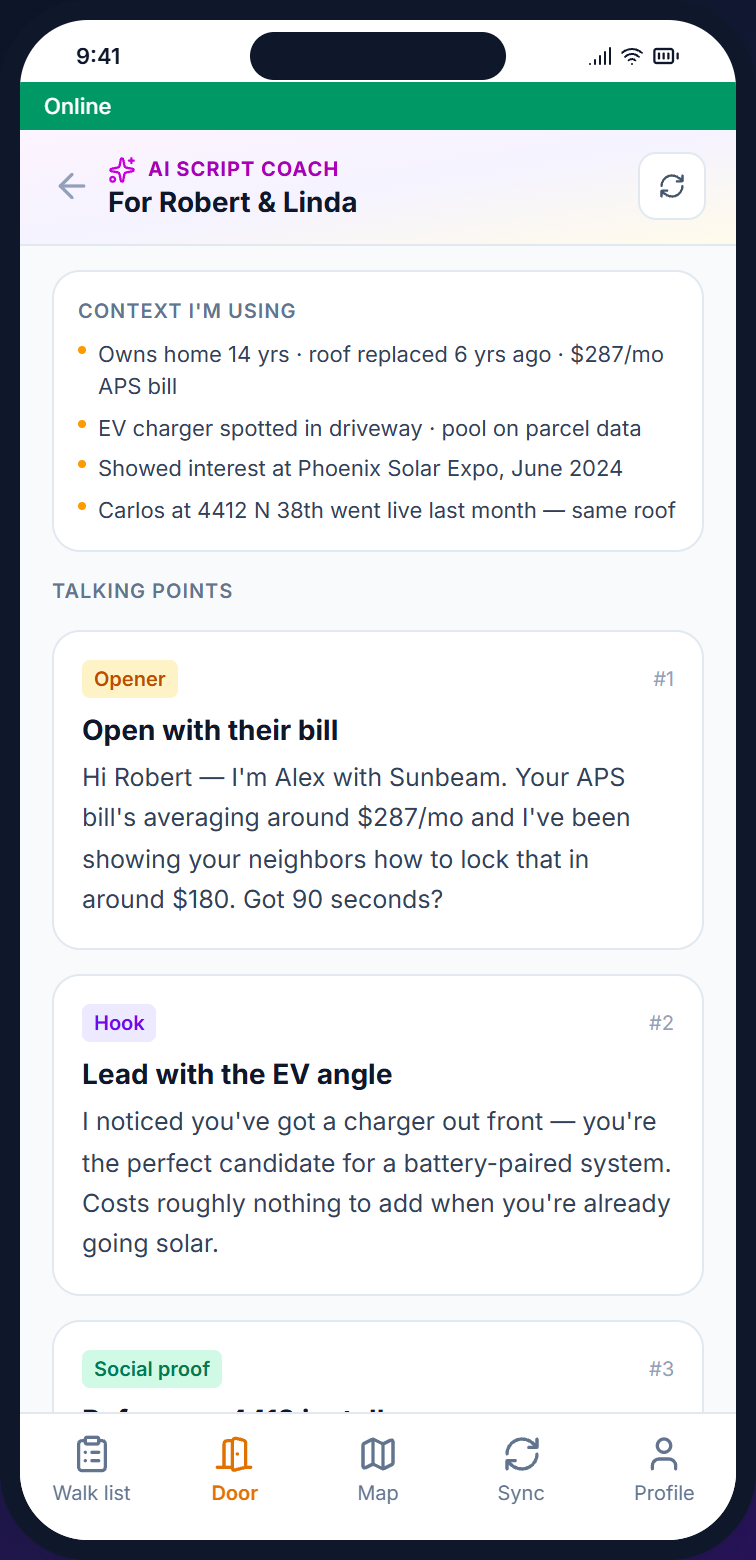
At 4408 N 38th St, the screen shows Robert & Linda Hayes, their lead score of 92, and notes from earlier visits. With the paid add-on, the AI Sales Coach uses the lead score, tags, and visit notes to suggest a one-line opening suited to the household. The estimate is generated and signed at the curb.

See how reps use it →
Beacon mobile visit list, route-ordered properties with a lead score for each stop
Beacon mobile door screen at 4408 N 38th St for Robert and Linda Hayes, with a lead score of 92 and door result buttons
AI Sales Coach overlay with suggested talking points for the next household

Home services FAQ

Home services door-knocking app FAQ: the questions operations managers ask first.

/Q, PRICING

Is pricing per truck or per rep?

Neither. Pricing is based on the number of leads on your list (contacts), not the number of people, so 5 reps or 50 cost the same. There are six tiers, from Starter at $59 (2,500 contacts) up to Enterprise at $599 (250K+).

/Q, PROPERTY DATA

Where does the property data come from?

Beacon's data enrichment service can add phone numbers, emails, age, income range, homeowner status, property value, length of residence, and dwelling type to each lead, and these details appear on the lead's record in the web dashboard. Beacon does not provide roof age, permit dates, or storm data. The lead score is calculated by rules from visit history and contact details.

/Q, ESTIMATES

Does Beacon have estimate templates?

Yes. Branded templates fill in the homeowner's name, address, and package pricing automatically. The rep creates the estimate at the door, and the homeowner signs it with GPS and timestamp recorded. There are no paper triplicates.

/Q, DISPATCH

Does it dispatch trucks?

No. Beacon is a field operations tool, not full field service management (FSM) software. Booked appointments can go to CoreCNX, and contacts and door results can be exported to CSV or sent to other software through signed webhooks (automatic updates).

/Q, OFFLINE

Does it work in suburban areas with no signal?

Yes. The mobile app keeps working without cell signal. Door screens are saved to the phone and uploaded when signal returns, so a rep does not lose a door result when brick walls block the signal.

/Q, INTEGRATION

Can we send text follow-ups after a visit?

Yes, from CampaignCNX+, a separate texting product with its own plans and its own account. A door result in Beacon does not start a CampaignCNX+ text, so your team sends the follow-ups from CampaignCNX+. Alma is your website chatbot. The CNX Suite's four products (Beacon, CampaignCNX+, Alma, and CoreCNX, a CRM) can be bought together on one bill, and you sign in to each with the same email address. Every plan includes unlimited reps, and the AI Script Coach is available as a paid add-on from $29/mo for reps who want talking points at the door.

Get started

Your home services reps can be visiting doors with their visit lists by Saturday morning.

Open an account, upload your lead list, and draw your first service area. Visit lists are on rep phones the next morning, with the lead score and earlier visits shown before they ring the bell.

Setup
Same day
Onboarding
Real person, not a chatbot
Free trial
14 days, no card