FEATURE / 05 · OFFLINE CANVASSING

Offline canvassing app — knock doors anywhere, sync when you're ready.

A Progressive Web App built for dead zones, apartment basements, and rural routes. The service worker caches the walk list. IndexedDB queues every disposition, note, and survey. When signal returns, it syncs in the background.

Type
PWA, no app store
Storage
IndexedDB queue
Sync
Auto on reconnect
WALK LIST · OFFLINE QUEUE · 1.2 MI TO GO
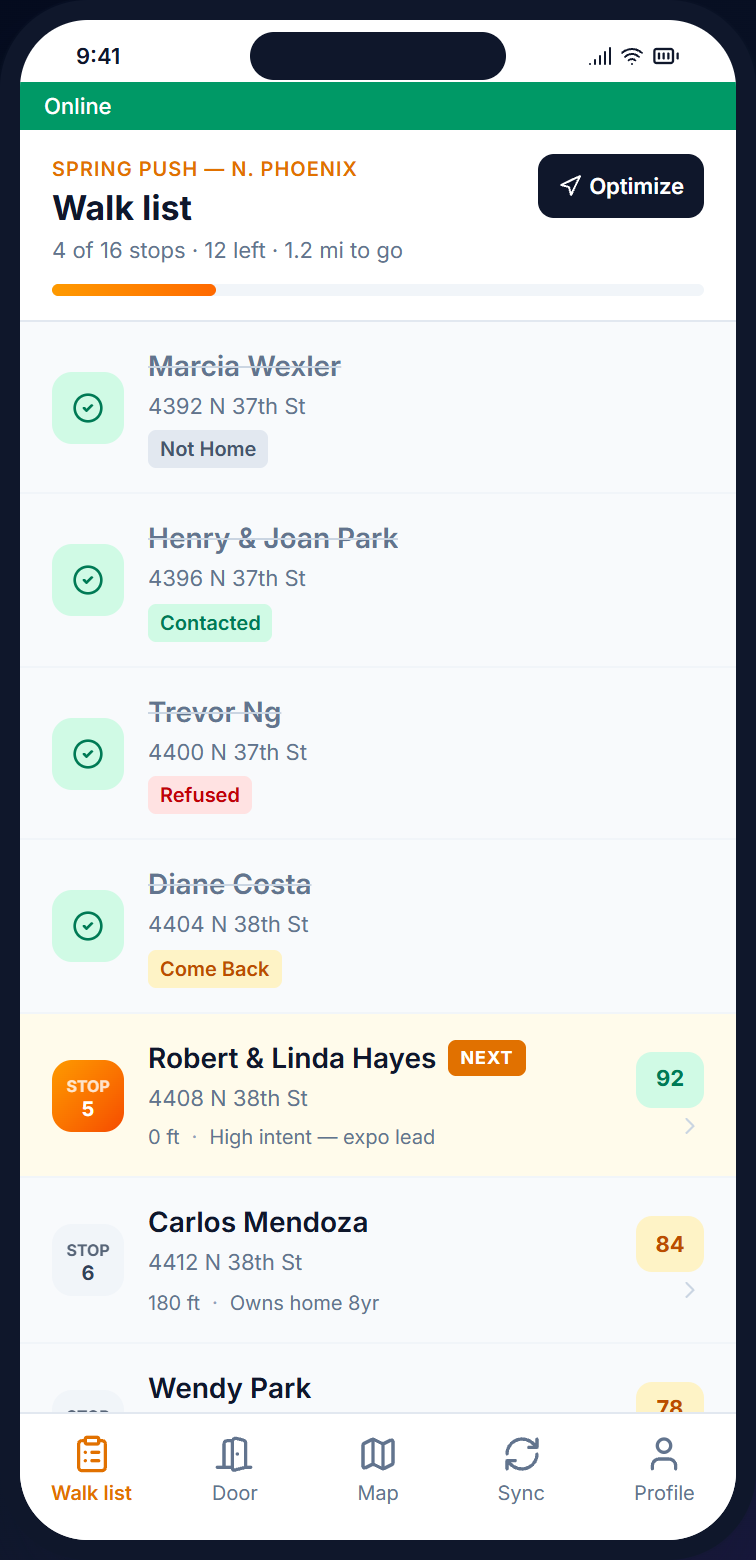
Beacon mobile walk list with online status indicator and route distance to next door — showing the offline-ready canvasser experience
Built for  rural GOTV · apartment basements · subway commutes · dead zones service worker · IndexedDB · auto-sync · PWA install

— Capabilities

Field-ready when the signal isn't.

Most canvassing tools assume connectivity. Beacon was built the other way around — every screen the canvasser uses works without a tower, and the data goes when the data can go.

/01 — CACHE

Service-worker shell

The app shell, walk list, contact details, and survey definitions cache to the device on first sync. Open the app at the door — no network round trip needed.

  • Service worker app shell
  • Walk list + contacts cached
  • Survey forms render from local data

/02 — QUEUE

IndexedDB write log

Every disposition, note, and survey response writes to IndexedDB first. Persistent across browser closes and phone restarts — nothing lost when the battery dies.

  • IndexedDB-backed queue
  • Persists across restarts
  • Visible "pending sync" count

/03 — SYNC

Auto on reconnect

When the device sees a connection, the queue ships in a batch. Server-side conflict resolution preserves duplicate visits as separate records.

  • Background batch upload
  • Conflict-safe duplicate handling
  • Online indicator on every screen

— On the door, off the grid

The door screen doesn't care if you have bars.

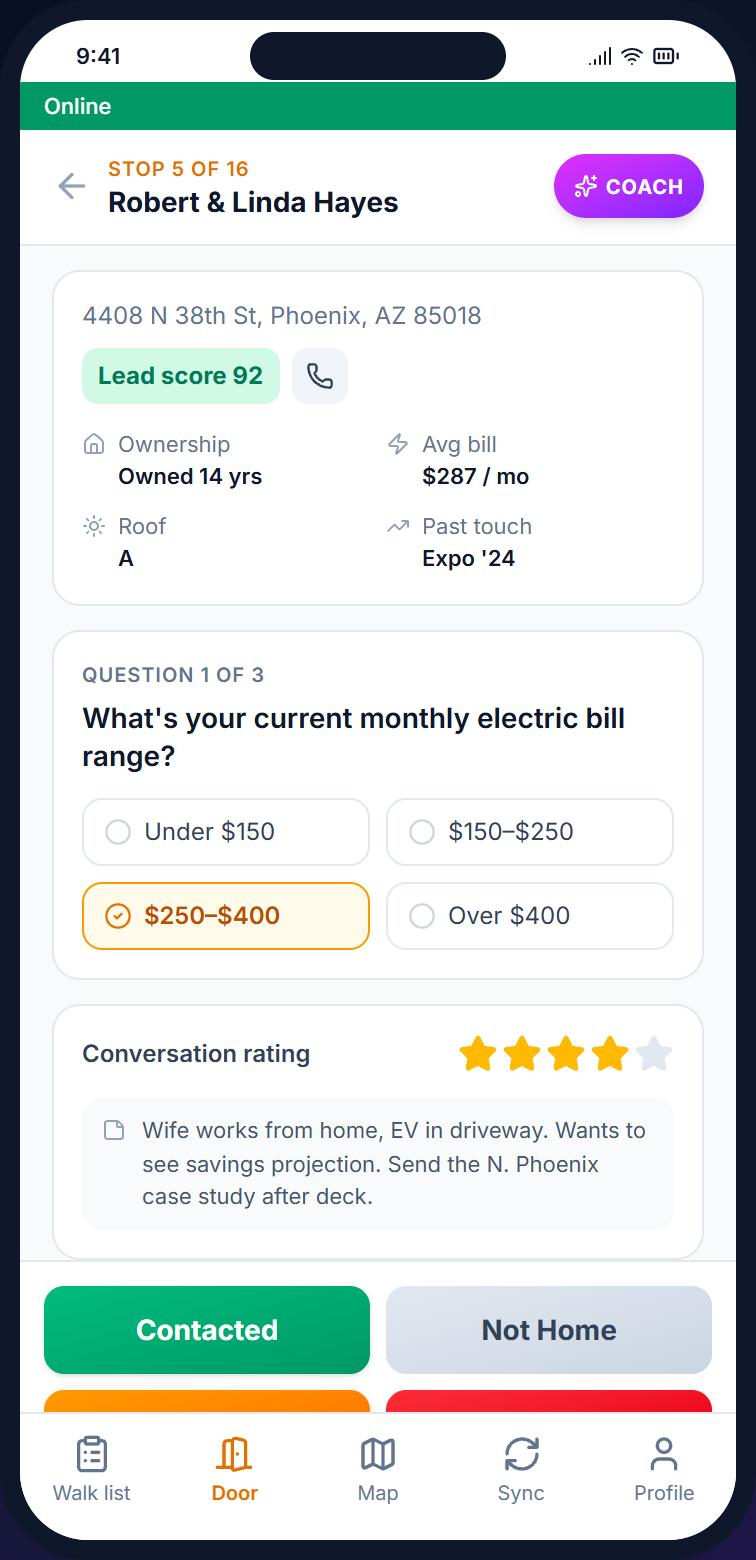
Disposition buttons, survey forms, AI talking points cached from the last sync — all rendering from local storage. The "Online" pill at the top of the walk list goes red when signal drops; everything else keeps working.

See the canvasser flow
Beacon mobile walk list with the Online status pill and route order — readable and editable while offline
Beacon mobile door screen with disposition buttons, survey questions, and notes — every action queued locally and synced later

— How an offline shift runs

Three steps and one auto-sync.

/01

Sync before you go

Open the app on wifi, tap sync. The walk list, contact details, survey definitions, and territory boundaries cache to the device.

/02

Knock without signal

Walk the list. Log dispositions, fill surveys, leave notes. Every action writes to IndexedDB. The "Online" pill turns red but nothing else changes.

/03

Drive back, auto-sync

The phone catches signal at a coffee shop or on the way back to HQ. The queue ships in the background. The pending counter clears.

/04

Manager sees the data

Knocks land in the activity feed. The map fills in. No spreadsheet hand-off, no end-of-day reconciliation.

— FAQ

Common questions.

Q / 01

How does sync work after offline?

Every offline interaction writes to IndexedDB on the device. The moment the phone sees a connection, queued interactions ship to the server in a batch. The server handles conflict resolution — two canvassers visiting the same contact stay as separate records.

Q / 02

What if my phone dies with unsynced data?

Data persists in IndexedDB. It survives browser closes, app restarts, and phone reboots. Open the app again, get connectivity, and the pending queue ships normally.

Q / 03

Do I need to install from the App Store?

No. Beacon is a Progressive Web App. On Android, Chrome offers "Add to Home Screen." On iOS, tap the Safari share button and choose "Add to Home Screen." App icon, full screen, no app store account.

Q / 04

How much data does it use?

The app shell is under 2MB on first load. A typical 500-contact walk list fits under 1MB. Once cached, the app uses no data until sync. A heavy day of door knocks (100+ logs) typically syncs in well under 500KB.

— Start walking

Send the team into the dead zone. Trust the data.

Open an account, install the PWA on your team's phones, run a sync. The list works whether or not the bars do.

Install
PWA · no app store
Storage
IndexedDB queue
Free trial
14 days, full access, no card