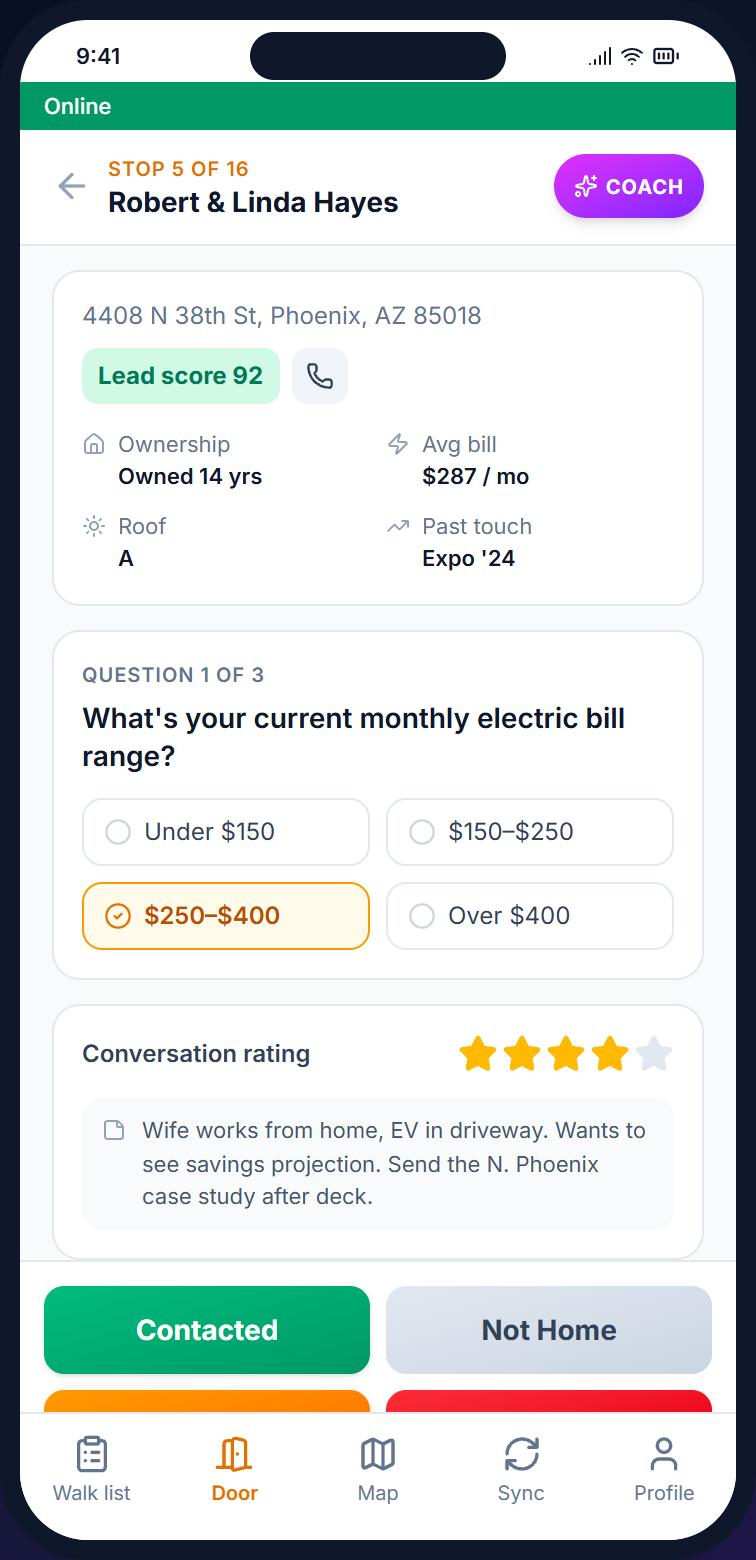
A drag-and-drop builder in the admin gives you five door-to-door survey question types: multiple choice, yes/no, rating, open text, and multi-select. The surveys render on the door screen, work offline, and tie every response back to the contact record. Included on every plan.
— Capabilities
Surveys live in the admin, attach to one or many campaigns, and render on the door screen when a canvasser logs a disposition. Form definitions cache locally so the survey works in basements, dead zones, and parking garages.
/01 — BUILD
Five question types (multiple choice, yes/no, rating 1-5 or 1-10, open text, and multi-select) with required flags, help text, and a mobile preview before you publish.
/02 — DELIVER
Once attached to a campaign, the survey appears on the canvasser's door screen when they pick a disposition. Form definitions cache locally for offline render in any dead zone.
/03 — CAPTURE
Every response links back to the contact, the interaction, the canvasser, and the campaign, building a full audit trail. Aggregates export as CSV or Excel for grant reporting or downstream analysis.
— What you can ask
Build voter-ID surveys with party-affiliation pickers, issue-advocacy questionnaires with rating scales, grant-reporting forms with required fields, and sales qualifying questions with multi-select. All from the same builder.
— How a survey gets fielded
The same loop runs for a 3-question voter ID survey or a 12-question advocacy questionnaire.
/01
Drag question types into the editor and set options, required fields, and rating ranges. Preview on mobile to see how the survey renders at the door.
/02
Link the survey to one or many campaigns and reuse it across multiple programs. Responses are still tracked per campaign, so you can compare cycles.
/03
The canvasser logs a disposition and the survey form appears inline. It works offline — responses queue locally and sync when signal returns.
/04
One-click CSV or Excel export bundles contact info, canvasser name, timestamp, and every answer in a flat format ready for a grant report or BI tool.
— FAQ
Q / 01
Five in total: multiple choice (single select), yes/no (boolean), rating scale (1-5 or 1-10), open text (free-form), and multi-select. Each can be marked required or optional.
Q / 02
Yes. Survey definitions are cached when canvassers sync their walk list, the form renders from local data, and responses are stored on the device. They sync to the server tied to the right contact and interaction when signal returns.
Q / 03
From the campaign dashboard, select the survey and click Export to download CSV or Excel. The export includes contact info, canvasser, timestamp, and every response in a flat format ready for analysis or grant submission.
Q / 04
Yes. Surveys are independent of campaigns, so you build once and attach to many. Responses are tracked per campaign, so you can compare results across cycles or chapters.
— Build a survey
Open a Beacon account, drag five questions into the survey builder, attach it to a campaign, and hand the canvassers a phone. Responses start arriving as the first doors are knocked.